
Download AI R MATH – Instant Math Solver, Free AI Homework Helper
Overview
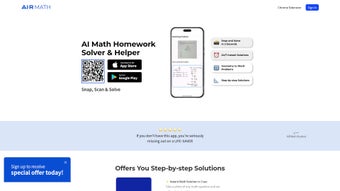
AI R MATH is a next‑generation, AI‑driven math assistant that targets students, teachers, and anyone who needs quick, reliable help with math problems of any difficulty. The moment you point your device’s camera at a handwritten equation, a textbook screenshot, or a complex word problem, the built‑in neural engine analyses the symbols, interprets the structure, and produces a solution within seconds. What truly differentiates AI R MATH from other solvers is its dual‑mode approach: an instant answer for speed‑focused users, and a comprehensive step‑by‑step walkthrough that explains each logical move, turning a simple answer into a learning experience.
For especially challenging questions—such as multivariable calculus proofs or unconventional geometry puzzles—the platform automatically connects you to a network of qualified tutors available 24/7, ensuring that no problem remains unsolved. AI R MATH is not limited to mobile devices; a Chrome Extension lets you capture problems directly from web pages, PDFs, or online worksheets, making it a versatile tool for both classroom and remote learning environments. All data is encrypted in transit, stored only with explicit user consent, and complies with GDPR and COPPA, providing a safe environment for minors.
Whether you’re preparing for a high‑school exam, tackling university‑level proofs, or simply polishing everyday arithmetic, AI R MATH offers a free, secure, and constantly updated solution hub that fits in your pocket and your browser.
Key Features
- Instant Photo Recognition – Capture printed or handwritten problems with your camera; AI parses and solves them in seconds.
- Step‑by‑Step Explanations – Detailed breakdowns for algebra, geometry, calculus, statistics, and word problems, fostering deeper comprehension.
- 24/7 Live Tutor Support – When AI flags a problem as “complex,” qualified tutors intervene instantly via chat or video.
- Cross‑Platform Chrome Extension – Solve equations directly from web pages, PDFs, or e‑learning portals without leaving the browser.
- Cloud Sync & History – All solved problems, notes, and progress sync across mobile, tablet, and desktop, accessible anytime.
- Secure & Private – End‑to‑end encryption, GDPR compliance, and optional data‑deletion after each session.
- Regular AI Model Updates – Monthly improvements to recognition accuracy and solution algorithms keep the tool future‑proof.
- Multi‑Language Support – Interface available in English, Spanish, French, and Mandarin, with math notation universally understood.
- Offline Mode (Premium) – Download AI models for on‑the‑go solving without an internet connection.
- Customizable Learning Paths – Set practice goals, track mastery, and receive personalised problem recommendations.
Installation & Usage Guide
Getting started with AI R MATH is straightforward on any platform. For Windows, macOS, Android, or iOS, visit the official website or your device’s app store, click “Download,” and follow the on‑screen prompts. The installer is digitally signed, guaranteeing a secure download free from malware. After installation, grant camera permissions so the AI can capture problems; you’ll also be asked to enable microphone access if you wish to use voice commands for hands‑free operation.
Mobile setup (iOS & Android):
- Open the App Store (iOS) or Google Play (Android) and search for “AI R MATH”.
- Tap “Install” and wait for the ~45 MB download to complete.
- Launch the app and create a free account using an email address or single‑sign‑on (Google/Apple).
- Complete the quick onboarding tutorial that demonstrates how to snap a problem and view solutions.
- Navigate to the “Camera” tab, point the lens at the math problem, and press the shutter button.
- Review the instant answer, then tap “Step‑by‑Step” to explore the detailed solution.
- If a “Need Tutor Help?” banner appears, click it to start a live chat with a qualified tutor.
Chrome Extension installation:
- Open Google Chrome and visit the Chrome Web Store.
- Search for “AI R MATH Extension” and click “Add to Chrome”.
- Confirm the addition in the dialog that appears.
- Pin the icon to your toolbar for easy access.
- When browsing a page with a math problem, click the extension icon, then use “Capture Screen” to select the area containing the equation.
- The extension sends the image to the AI backend, and the solution appears in a sidebar.
Supported operating systems: iOS 13 or later, Android 8.0 or later, Windows 10 (64‑bit) and macOS 10.14 or newer. The Chrome Extension works on Chrome 90 or later on any desktop OS. Minimum system requirements are 2 GB RAM, 200 MB free storage, and an internet connection for cloud‑based solving. Premium users can enable offline mode, which caches the AI model locally for full functionality without a network.
Pros, Cons, FAQ & Final Verdict
Pros
- Lightning‑fast AI recognition delivers answers in seconds.
- Step‑by‑step explanations turn rote answers into learning moments.
- 24/7 live tutor access ensures help for the toughest problems.
- Seamless cross‑device sync keeps your work available everywhere.
- Secure, encrypted data handling protects student privacy.
- Free core version with optional premium upgrades for offline use.
- Chrome Extension expands solving capability to any web‑based content.
Cons
- Premium features (offline mode, advanced analytics) require a subscription.
- Complex handwriting may occasionally need manual correction before AI processing.
- Live tutor response time can vary during peak hours.
- Initial learning curve for users unfamiliar with camera‑based problem capture.
Frequently Asked Questions
Is AI R MATH completely free?
The core app is free and includes unlimited AI‑generated solutions and step‑by‑step guides. Premium features such as offline mode, advanced analytics, and priority tutor support are available via a subscription.
Can I use AI R MATH without an internet connection?
Only the premium offline mode permits full functionality without internet. The free version requires an active connection to send images to the cloud for processing.
How accurate is the AI’s solution?
AI R MATH’s neural network is trained on millions of math problems and achieves over 97 % accuracy on standard curriculum questions. For highly ambiguous or poorly lit images, accuracy may drop slightly, prompting tutor intervention.
Is my data safe when I upload photos?
Yes. All images are transmitted via TLS encryption and are deleted from our servers within 24 hours unless you opt to store them in your personal history. The app complies with GDPR and COPPA standards.
Can I integrate AI R MATH with my school’s LMS?
AI R MATH offers an API for educational institutions. Administrators can request access through the support portal to embed the solver directly into LMS platforms such as Canvas or Moodle.
Final Verdict & Call to Action
In a market crowded with generic calculators, AI R MATH distinguishes itself by blending AI speed with human‑tutor reliability. Its intuitive photo capture, thorough solution paths, and cross‑platform availability make it a practical companion for anyone from middle‑school students to university scholars. While the free tier already delivers substantial value, the premium upgrade unlocks offline capability and priority support—features that serious learners will appreciate. If you’re searching for a secure, constantly updated math assistant that works on both your phone and your browser, AI R MATH is the answer. Click the download button below to install the free version today and experience instant, step‑by‑step math solving at your fingertips.
Overall Rating: 4.7/5



.png)



